MeeBhoomi
MeeBhoomi (మీభూమి) is the official land records registry for the state of Andhra Pradesh. Launched by the Revenue Department (రెవెన్యూ శాఖ), it was created to bring transparency to real estate and help farmers (రైతులు) and landowners access their data without any middlemen (మధ్యవర్తులు).
You can easily view and download essential documents like your 1B, Adangal (అడంగల్), and Village Map (గ్రామ పటం) through the official Andhra Pradesh land records portal. This digital platform also allows you to track mutations (మార్పులు/చేర్పులు), access your E-Passbook (ఈ-పట్టాదారు పాస్ బుక్), and check FMB sketches from the comfort of your home (మీ ఇంటి నుండే).
Meebhoomi Online Services (మీ భూమి ఆన్లైన్ సేవలు)
| Category (వర్గం) | Details (వివరాలు) |
|---|---|
| Portal Name (పోర్టల్ పేరు) | Meebhoomi (మీ భూమి) |
| State (రాష్ట్రం) | Andhra Pradesh (ఆంధ్రప్రదేశ్) |
| Launched By (ప్రారంభించిన వారు) | Government of Andhra Pradesh (Launched in June 2015 – జూన్ 2015లో ప్రారంభించారు) |
| Department (శాఖ) | Revenue Department (రెవెన్యూ శాఖ) |
| Official Site (అధికారిక వెబ్సైట్) | meebhoomi.ap.gov.in (మీ భూమి అధికారిక వెబ్సైట్) |
Key Services You Can Access on MeeBhoomi (మీ భూమి ద్వారా పొందగల ముఖ్య సేవలు)
The portal offers several essential documents that every landowner should know about. (ఈ పోర్టల్ ప్రతి భూమి యజమాని తెలుసుకోవాల్సిన ముఖ్యమైన పత్రాలను అందిస్తుంది.) Here is a breakdown of the most popular services: (ఇక్కడ ప్రముఖ సేవల సంక్షిప్త వివరణ ఉంది.)
1. Adangal (Pahani) (అడంగల్ / పహాణి)
The Adangal is like a diary for your land. (అడంగల్ మీ భూమికి సంబంధించిన డైరీ లాంటిది.) It contains details about the land type, the nature of the soil, liabilities (like loans), and most importantly, the crops being grown there. (భూమి రకం, మట్టి స్వభావం, అప్పులు మరియు సాగు చేసే పంటల వివరాలు ఇందులో ఉంటాయి.)
- Why you need it: It’s essential for getting bank loans, government subsidies, and crop insurance. (బ్యాంక్ రుణాలు, ప్రభుత్వ సబ్సిడీలు మరియు పంట బీమా కోసం ఇది అవసరం.)
2. 1-B (Record of Rights) (1-బి / హక్కుల రికార్డు)
If the Adangal is a diary, the 1-B is the "Identity Card" of your land. (అడంగల్ డైరీ అయితే, 1-బి మీ భూమి యొక్క గుర్తింపు కార్డు లాంటిది.) It serves as the ultimate legal proof of ownership. (ఇది భూమి యాజమాన్యానికి చట్టబద్ధమైన ఆధారంగా ఉపయోగపడుతుంది.)
- Why you need it: You cannot sell or transfer property legally without a 1-B document. (1-బి లేకుండా భూమిని చట్టపరంగా అమ్మడం లేదా బదిలీ చేయడం సాధ్యం కాదు.)
3. Electronic Passbook (E-Passbook) (ఎలక్ట్రానిక్ పాస్బుక్)
Forget carrying around a physical booklet. (ఇకపై భౌతిక పాస్బుక్ తీసుకెళ్లాల్సిన అవసరం లేదు.) You can now download a digital version of your ownership passbook directly from the site. (మీ యాజమాన్య పాస్బుక్ను డిజిటల్ రూపంలో డౌన్లోడ్ చేసుకోవచ్చు.) It’s secured with an OTP (One-Time Password) sent to your registered mobile number. (మీ నమోదిత మొబైల్ నంబర్కు వచ్చే ఓటీపీతో ఇది సురక్షితం.)
4. Village Maps & FMB (గ్రామ పటాలు & ఎఫ్ఎంబీ)
Want to see the exact boundaries of your plot? (మీ భూమి యొక్క ఖచ్చితమైన సరిహద్దులను చూడాలనుకుంటున్నారా?) The Field Measurement Book (FMB) and Village Maps provide a geographical layout of land parcels, helping you avoid boundary disputes with neighbors. (ఈ పటాలు భూమి సరిహద్దుల వివాదాలను నివారించడంలో సహాయపడతాయి.)
| Term | Telugu Term | Description |
|---|---|---|
| Owner | పట్టాదారు (Pattadar) | The person who legally owns the land. |
| Land Map | ఎఫ్.ఎమ్.బి (FMB) | The sketch showing boundaries. |
| Land Record | అడంగల్ / పహాని | The document showing land usage and ownership. |
| Passbook | పట్టాదారు పాస్ పుస్తకం | The physical or digital book held by the owner. |
Common Problems & Solutions (సమస్యలు - పరిష్కారాలు)
Sometimes, the data on the screen doesn't match the reality on the ground. Here is how to fix the most common issues:
Name Mismatch (పేరు తప్పుగా ఉండటం)
- Problem: The owner's name on MeeBhoomi is different from your Aadhaar or Pattadar Passbook.
- Reason: Data entry errors during digitization or pending Mutation (transfer of ownership).
- Solution: Apply for ROR (Record of Rights) Correction at your nearest MeeSeva center.
Wrong Survey Number (సర్వే నంబర్ తప్పు)
- Problem: The survey number shows the wrong land area (Extent) or location.
- Reason: Sub-divisions (like 12-A, 12-B) were not updated correctly in the system.
- Solution: Visit the Tahsildar (MRO) office and request a survey verification using the FMB (Field Measurement Book) sketch.
“No Data Available” (వివరాలు కనిపించకపోవడం)
- Problem: Your land details simply don't show up.
- Reason: The village data might still be uploading, or it could be Inam or Assigned land.
- Solution: Submit a written request to the Revenue Office to include your records in Webland.
2. How to Correct Land Records in MeeBhoomi
You cannot edit records directly on the website. You must follow the official MeeSeva process:
- Visit MeeSeva: Request an Adangal/1B Correction service.
- Submit Documents: You will need your Sale Deed, Aadhaar, and old Passbook.
- Verification: The application goes to the Tahsildar. A VRO (Village Revenue Officer) may conduct a field visit.
- Update: Once approved, the record is updated in Webland, and it will automatically reflect on the MeeBhoomi portal within a few days.
Timeframe: Simple spelling fixes take 15–30 days, while survey/boundary issues can take 30–60 days.
3. Why MeeBhoomi is Vital for Farmers (రైతులకు కలిగే ప్రయోజనాలు)
For a farmer in AP, MeeBhoomi is more than just a website; it’s a gateway to government support:
- Crop Loans (పంట రుణాలు): Banks verify your Adangal and 1B online before clearing loans.
- Rythu Bharosa: Your land data is the basis for receiving investment support and other subsidies.
- Crop Insurance (PMFBY): If the "Crop Type" recorded in the Adangal is wrong, your insurance claim could be rejected. Always check your E-Crop status!
- Digital Passbook: You can download an E-Passbook, which carries the same legal weight as the physical book.
4. Legal & Real Estate Importance
If you are buying or selling land, MeeBhoomi is your first line of defense against fraud.
- Buyer Beware: Always check the Survey Number and Owner Name on MeeBhoomi before paying any advance.
- Court Evidence: While the registered Sale Deed is the final authority, courts heavily rely on MeeBhoomi's ROR and Adangal to settle boundary and inheritance disputes.
- Registration Check: Sub-registrars verify MeeBhoomi data before allowing a land sale. If there is a "Lock" or "Dispute" status, the registration will be blocked.
Summary Table for Quick Reference
| Issue | Authority to Approach | Primary Document Needed |
|---|---|---|
| Name/Spelling Error | MeeSeva / Tahsildar | Aadhaar & Sale Deed |
| Boundary/Map Issue | District Survey Office | FMB Sketch |
| Loan/Subsidy Help | Agriculture Officer / Bank | Updated Adangal |
| Missing Records | MRO Office | Registration Documents |
Check Adangal (అడంగల్)
The Adangal provides details about the land's nature, crops, and current usage.
- Visit the Website: Go to meebhoomi.ap.gov.in.
- Select Adangal: On the top menu, hover over Adangal (అడంగల్) and choose either "Your Adangal" (మీ అడంగల్) or "Village Adangal" (గ్రామ అడంగల్).
- Enter Details: Choose your District (జిల్లా), Mandal (మండలం), and Village (గ్రామం).
- Search Criteria: You can search using your Survey Number (సర్వే నంబర్), Khata Number (ఖాతా నంబర్), or Aadhaar Number.
- Captcha: Enter the code shown on the screen and click Submit (క్లిక్ చేయండి).
- View/Print: Your record will appear. You can download or print it for your reference.
Check ROR 1-B (1-బి రికార్డు)
The 1-B is the Record of Rights, focusing on official ownership and liabilities.
- Select 1-B: Click on the 1-B tab on the homepage.
- Choose Type: Select "Your 1-B" (మీ 1-బి) or "Village 1-B" (గ్రామ 1-బి).
- Input Location: Select your District, Mandal, and Village from the dropdown menus.
- Identification: Enter your Khata Number or Survey Number.
- Verification: Enter the Captcha code and click Submit.
- Results: Review the ownership details and use the Print option at the bottom to save a copy.
Check FMB & Village Maps (ఎఫ్.ఎమ్.బి మరియు గ్రామ పటం)
These are essential for understanding physical boundaries and layout.
- Navigate to Maps: Click on the FMB or Village Map (గ్రామ పటం) option in the main menu.
- Select Region: Choose your District, Mandal, and Village.
- Survey Number: For FMB (Field Measurement Book), enter the specific Survey Number you wish to see.
- Submit: Enter the Captcha and click Submit.
- Digital Sketch: A detailed sketch of the plot or the entire village map will be generated as a PDF.
Check Land Disputes (భూ వివాదాల వివరాలు)
Before buying land, it is critical to check for ongoing legal issues.
- Others Section: Go to the Others (ఇతరములు) tab or look for "Village Land Disputes" (గ్రామ భూ వివాదాల వివరాలు).
- Enter Details: Select your District, Mandal, and Village.
- Submit: Click the button to see a table listing any survey numbers currently involved in court cases or disputes.
Meebhoomi Login
-
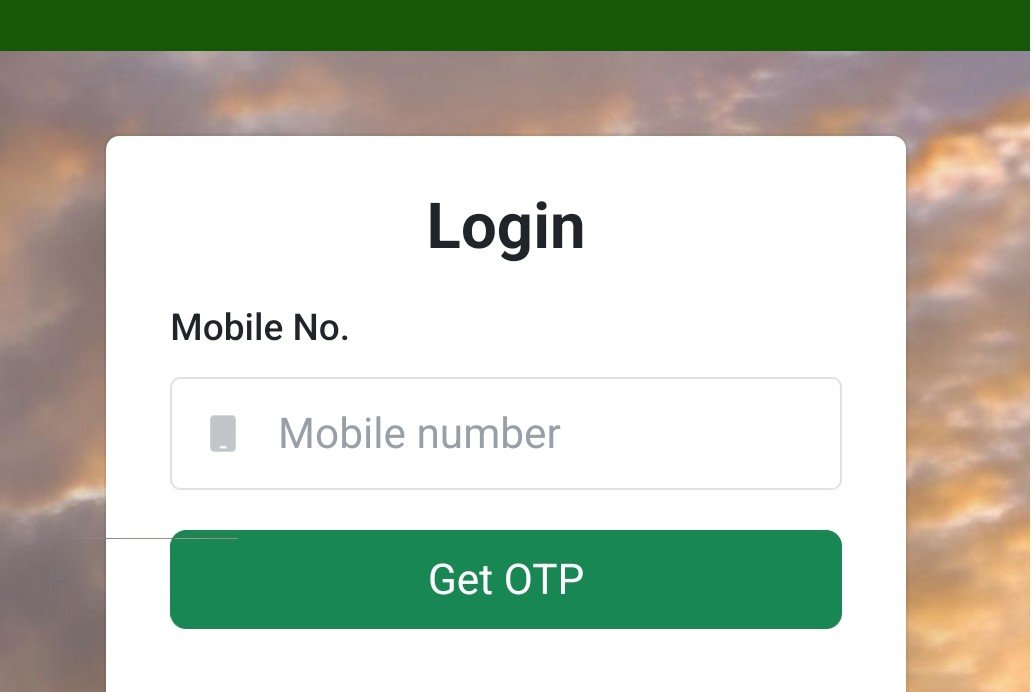
Access the Login Section:
- When you open the official Meebhoomi portal, look for the "Login" button.
-
Request OTP:
- Enter your Registered Mobile Number in the space provided.
- Click on the "Get OTP" button.
- Note: Ensure this is the mobile number linked to your land records/Aadhaar.
-
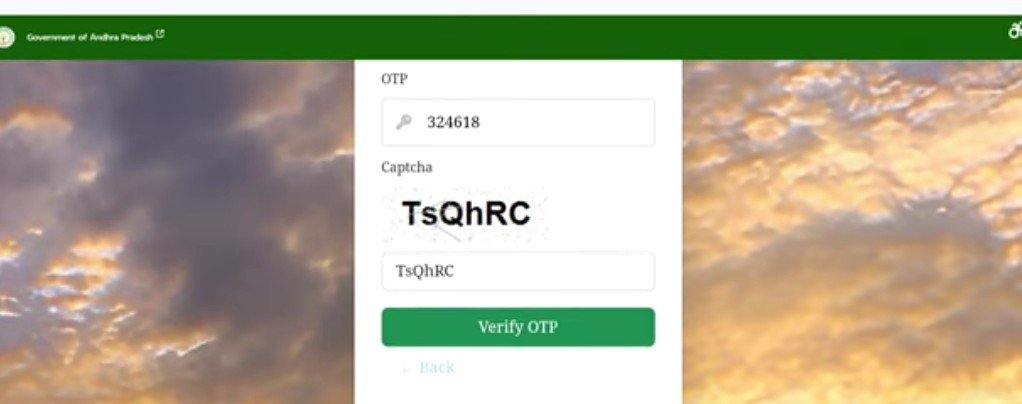
Authentication Page:
A new screen or pop-up will appear. Here, you must:- Enter the OTP (6-digit code) sent to your phone.
- Enter the Captcha Code exactly as it appears in the image.
- Click on the "Verify OTP" button.
-
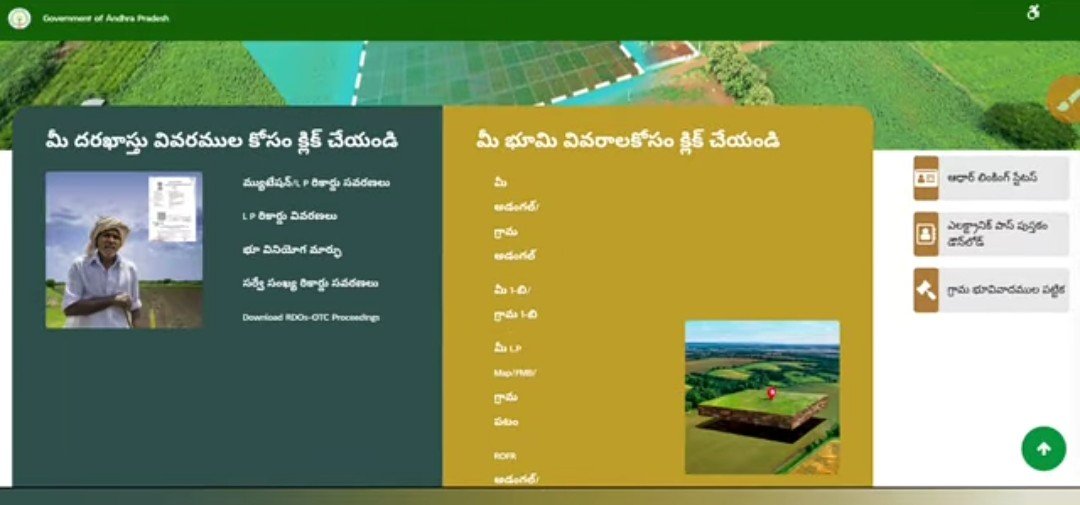
Landing on the Service Page:
Once verified, the portal "unlocks," taking you to the main dashboard or service page. From here, you can select specific tasks like:- Adangal/Pahani (Land use details)
- 1-B (Ownership records)
- FMB/Village Maps
Field Measurement Book (FMB) / పటము (Patamu)
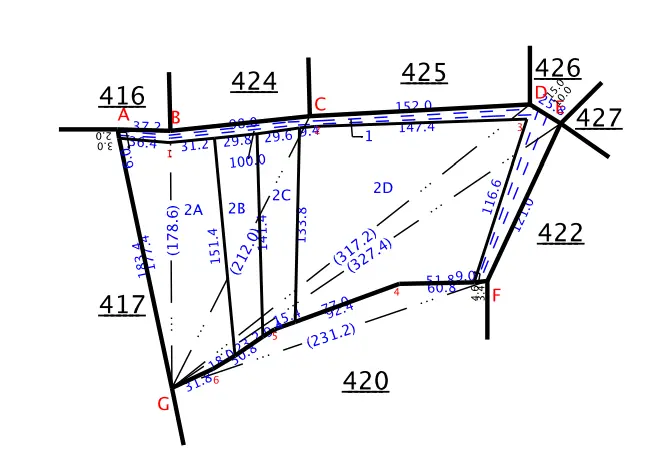
The FMB is essentially the "map" of your land. It contains sketches of land boundaries based on official survey records.
- Purpose: It is the primary document used to resolve Boundary Disputes (సరిహద్దు వివాదాలు).
-
Digital Access: You can download these sketches via the
FMB section on the MeeBhoomi portal.
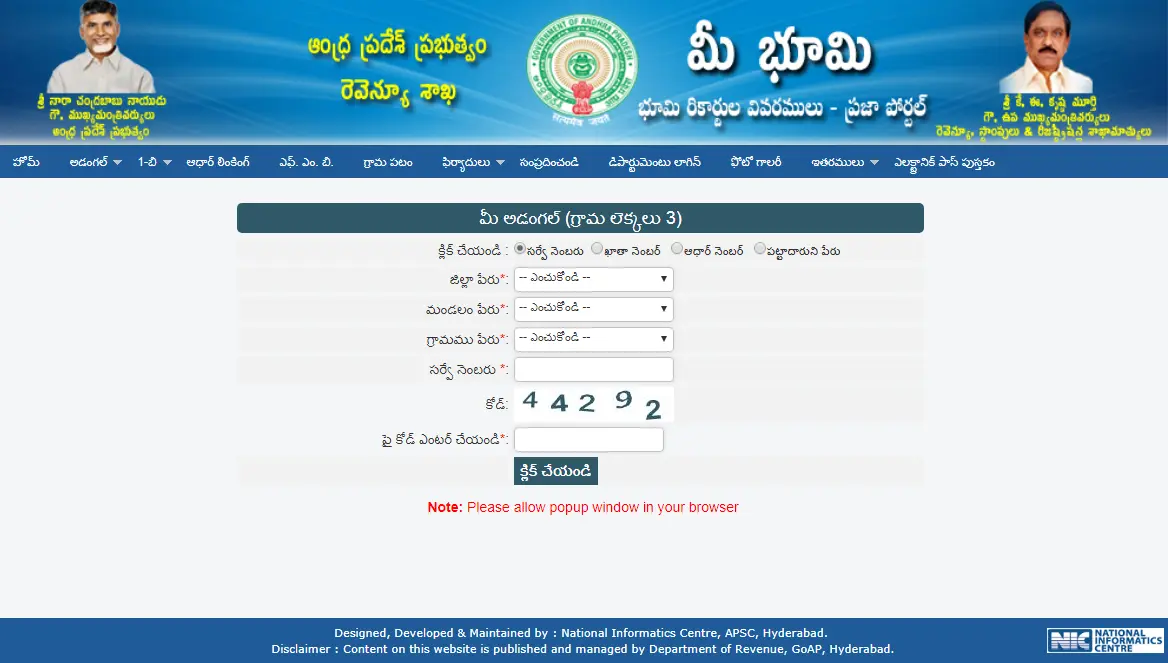
How to Download Your Adangal (అడంగల్) Online
The Adangal (also known as Pahani) is a detailed record of land nature, soil type, and crop details. Follow these steps:
-
Visit the Portal: Go to
meebhoomi.ap.gov.in
-
Select 'Adangal': In the main menu, look for
"Adangal" (అడంగల్). You can choose:
- Your Adangal (మీ అడంగల్ - Personal)
- Village Adangal (గ్రామ అడంగల్ - Public)
-
Enter Location Details: Use the dropdown menus to select your:
- District (జిల్లా)
- Mandal/Zone (మండలం)
- Village (గ్రామం)
-
Search Method: You can find your records using:
- Survey Number (సర్వే నంబరు)
- Account / Khata Number (ఖాతా నంబరు)
- Aadhaar Number (ఆధార్ నంబరు)
- Pattadar Name (పట్టాదారు పేరు)
- Verify & Submit: Enter the Captcha (సెక్యూరిటీ కోడ్) and click "Click" to view the report.
How to Download Your MeeBhoomi E-Passbook (ఈ-పాస్బుక్ డౌన్లోడ్ విధానం)
The Electronic Pattadar Passbook (e-Passbook) is a digital version of your land ownership document. It is legally valid for bank loans, crop insurance, and government schemes.
Step-by-Step Process:
-
Visit the Official Website:
Go to meebhoomi.ap.gov.in. -
Locate the Menu:
On the main menu (Top bar), click on 'Electronic Passbook' (ఎలక్ట్రానిక్ పట్టాదార్ పాస్బుక్). -
Enter Your Details (వివరాలు నమోదు చేయండి):
You will need to provide the following information:- District (జిల్లా)
- Zone/Mandal (మండలం)
- Village (గ్రామం)
- Account Number (ఖాతా సంఖ్య) or Aadhaar Number (आधार సంఖ్య)
-
Verification:
Enter your registered Mobile Number and the Captcha Code displayed on the screen. -
OTP Authentication:
Click on "Click" to receive an OTP. Enter the code sent to your mobile. -
Download & Print:
Once verified, your digital passbook will appear. Click on 'Download' to save the PDF or 'Print' for a physical copy.
| English Term | Telugu Term | Meaning/Usage |
|---|---|---|
| Pattadar | పట్టాదార్ | The legal owner of the land. |
| Khata Number | ఖాతా సంఖ్య | The unique account number assigned to a landowner. |
| Survey Number | సర్వే నంబర్ | The specific number given to a piece of land. |
| Extent | విస్తీర్ణం | The total area/size of the land (measured in Acres/Cents). |
| Mutation | మ్యుటేషన్ | The process of transferring land ownership. |
Benefits of the E-Passbook (ఈ-పాస్బుక్ వల్ల ప్రయోజనాలు)
- Bank Loans (బ్యాంక్ రుణాలు): Banks accept the digital copy to verify land ownership for Crop Loans (పంట రుణాలు).
- Instant Access: No need to visit the MRO office or wait for a physical book; you can download it anywhere, anytime.
- Security: It features a unique QR Code. Anyone scanning this code can verify the authenticity of the record online, reducing the risk of fraud.
- Government Schemes: Essential for receiving benefits like Rythu Bharosa (రైతు భరోసా) and input subsidies.
What if your Passbook is not downloading?
If you see an error like "Data Not Found," it usually means:
- Your Aadhaar is not seeded (linked) with your land record.
- The Mobile Number in the records is outdated.
- The land is under a Dispute (కోర్టు వివాదాలు) or is prohibited for registration.
Next Step: In such cases, you must visit the VRO (Village Revenue Officer) or the Tahsildar office to update your KYC details in the Webland system.
How to Link Aadhaar with Land Records (ఆధార్ అనుసంధానం)
Linking your Aadhaar helps prevent Fraudulent Transactions (మోసపూరిత లావాదేవీలు). To check your status:
-
Go to the
"Aadhaar/Other Identities" (ఆధార్/ఇతర గుర్తింపులు) menu.
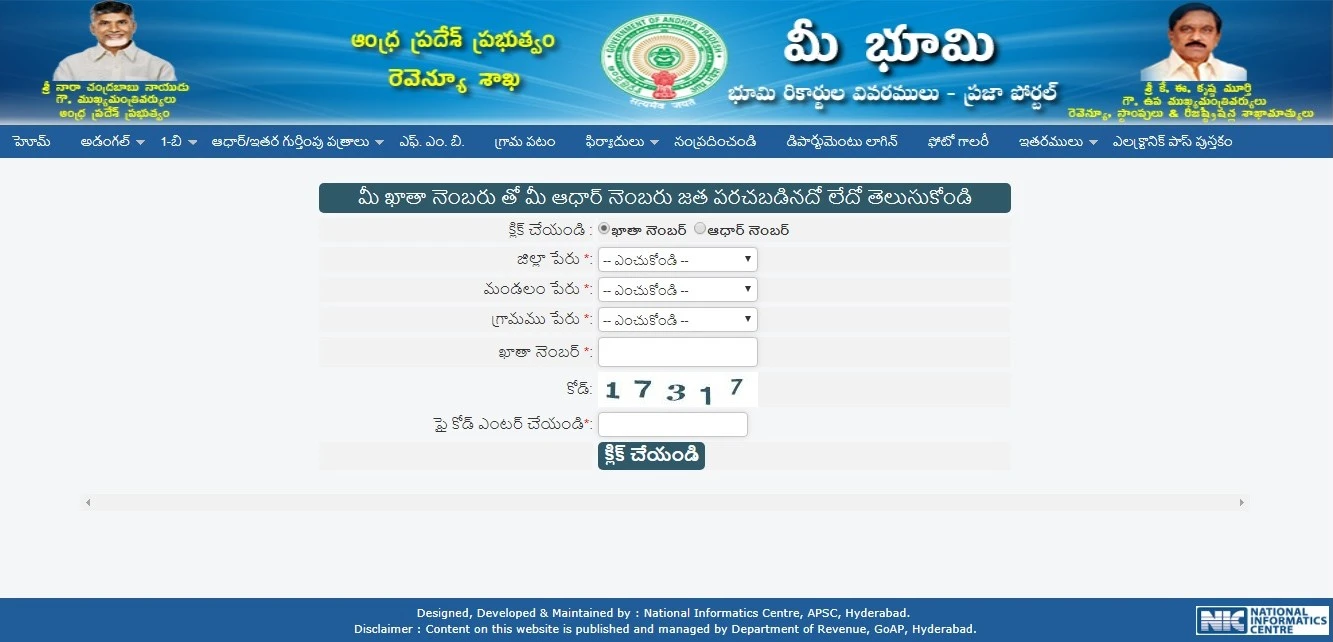
- Select "Aadhaar Linking" (ఆధార్ అనుసంధానం).
- Enter your District (జిల్లా), Zone (మండలం), Village (గ్రామం), and Account Number (ఖాతా నంబరు).
- The system will show if your KYC is completed or pending.
Meebhoomi fee Structure
| Service Type (సేవ రకం) | Online View / Download (ఆన్లైన్ వీక్షణ / డౌన్లోడ్) | Certified Copy (at Secretariat / MeeSeva) (సర్టిఫైడ్ కాపీ – సచివాలయం / మీ సేవ) |
|---|---|---|
| Adangal (Pahani) (అడంగల్ / పహాణి) | Free or ₹25 (ఉచితం లేదా ₹25) | ₹40 |
| ROR-1B (Record of Rights) (హక్కుల రికార్డు – 1బి) | Free or ₹25 (ఉచితం లేదా ₹25) | ₹40 |
| Electronic Passbook (ఎలక్ట్రానిక్ పాస్బుక్) | Free (ఉచితం) | According to fixed govt fee (ప్రభుత్వ నిర్ణయించిన రుసుము ప్రకారం) |
| Aadhaar Linking (ఆధార్ లింకింగ్) | Free (ఉచితం) | Free (ఉచితం) |
| Village Map / FMB (గ్రామ పటం / ఎఫ్ఎంబీ) | Free (ఉచితం) | ₹35 - ₹40 |
| Mutation Application (మ్యూటేషన్ దరఖాస్తు) | — | ~₹150 (సుమారు ₹150) |
| Correction Requests (సవరణ అభ్యర్థనలు) | ~₹35 (సుమారు ₹35) | — |
Why Use MeeBhoomi?
- Transparency: No more hidden "fees" or manual errors. What you see is what is recorded.
- Convenience: Access your records 24/7 from a smartphone or computer.
- Speed: Getting a bank loan is much faster when you can provide digital proof of ownership immediately.
- Dispute Resolution: Easily track land disputes or mutation (transfer) statuses online.
Contact Detail
| Detail Type (వివరాల రకం) | Official Information (అధికారిక సమాచారం) |
|---|---|
| Official Website (అధికారిక వెబ్సైట్) | meebhoomi.ap.gov.in (మీ భూమి అధికారిక వెబ్సైట్) |
| Toll-Free Number (టోల్-ఫ్రీ నంబర్) | 14400 |
| Phone Number (ఫోన్ నంబర్) | 0863-2447777 |
| Official Email ID (అధికారిక ఇమెయిల్ ఐడి) | ccla-as-cmro@ap.gov.in |
| Alternate Email (ప్రత్యామ్నాయ ఇమెయిల్) | meebhoomi-ap@ap.gov.in |
| Office Address (కార్యాలయ చిరునామా) | Revenue Department, Velagapudi, Amaravati, Guntur District, Andhra Pradesh (రెవెన్యూ శాఖ, వెలగపూడి, అమరావతి, గుంటూరు జిల్లా, ఆంధ్రప్రదేశ్) |
FAQs
What is the difference between Adangal and 1-B?
- Adangal: A detailed village record showing the land type, soil, irrigation source, and current crops being grown.
- 1-B (ROR): The official Record of Rights that focuses on ownership. It proves who legally owns the land and lists any loans or mortgages against it.
Can I download my land records without linking Aadhaar?
Yes and No. You can view and download standard Adangal and 1-B records using just your Survey Number or Khata Number. However, to download an Electronic Passbook, Aadhaar linking and OTP verification are mandatory for security.
How do I correct a spelling mistake in my land records?
You can file a Correction Request directly on the portal under the "Complaints" or "Grievance" section. You will need to upload supporting documents (like your Aadhaar or Sale Deed). Corrections are usually processed by the Mandal Revenue Office within 15 days.
Is the online copy from Meebhoomi legally valid?
Yes. Digitally signed documents and Electronic Passbooks downloaded from the portal are legally valid for bank loans, court proceedings, and government schemes. They often feature a QR code for instant verification.
How can I download my MeeBhoomi E-Passbook?
Simply visit the portal, click on the "Electronic Passbook" option, enter your account details and mobile number, and verify the OTP to download the PDF.